

Most producers think better vocal mixes come from better plugins. That is usually wrong. The difference between amateur and professional vocals is not the tools. It is the order of operations and how each step is executed.
The real problem is stacking effects without fixing the source. If the vocal is poorly recorded, unedited, or unbalanced, no plugin chain will fix it. Clean vocals come from controlled decisions at every stage, starting before mixing even begins.
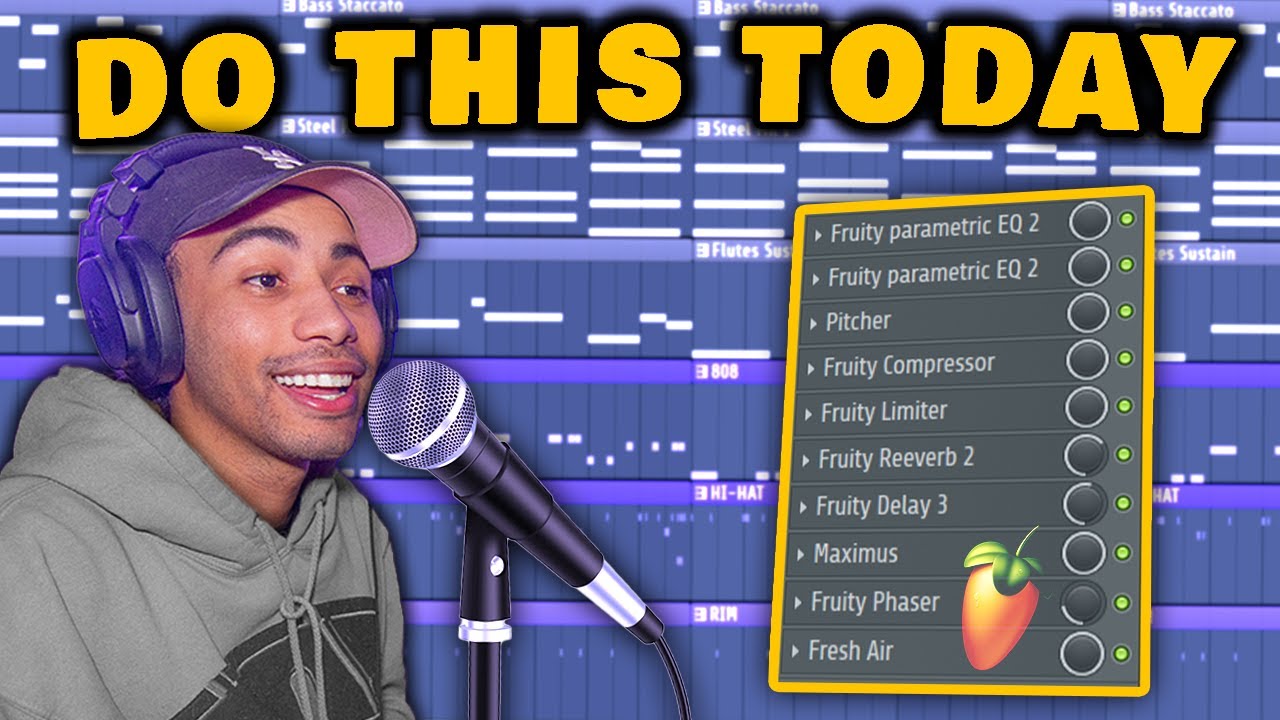
This breakdown focuses on a complete vocal chain built entirely with FL Studio stock plugins. The goal is not to replicate expensive processing chains. It is to build a clean, controlled vocal that sits properly in a mix using only fundamental techniques.
Video Breakdown
The video walks through a full vocal workflow from raw recording to final mix. It starts with take selection and editing, then moves into corrective EQ, pitch correction, compression, and spatial effects.
The key concept is that each stage solves a specific problem. Nothing is added randomly. Every plugin in the chain has a defined purpose, and the order of the chain determines the final result.
The demonstration also reinforces an important point. Stock plugins are more than capable of producing professional results when used correctly. The limitation is not the tools. It is the technique behind them.
What It Gets Right
The core principle demonstrated is structured vocal processing.
The workflow follows a clear sequence: clean the audio, correct problems, shape the tone, control dynamics, then add space and enhancement. This prevents over-processing and keeps the vocal clear.
It also emphasizes subtlety. Effects are not pushed aggressively. Instead, each adjustment is controlled so the vocal remains natural while still cutting through the mix.
Where Producers Go Wrong
The most common mistake is skipping editing.
Leaving breaths, dead space, and rough cuts in the vocal creates noise and inconsistency that no plugin can fully fix. Clean editing is the foundation of a professional vocal.
Another mistake is overusing EQ boosts instead of cutting problem frequencies. This leads to harshness and imbalance.
Producers also tend to over-compress vocals. This removes dynamics and creates a flat, lifeless sound.
Finally, many rely too heavily on reverb and delay, which pushes the vocal too far back in the mix.
Real Technique Breakdown
Take selection determines the ceiling of the mix.
- Record multiple takes and choose the strongest performance
- Avoid relying on editing to fix weak delivery
- Consistency across takes improves final clarity
This works because performance quality defines everything that follows. It fails when the source recording is inconsistent.
Editing removes unwanted noise and prepares the signal.
- Cut dead space and breathing between phrases
- Apply fades to avoid harsh transitions
- Keep timing tight without sounding unnatural
This works because it cleans the signal before processing. It fails when noise is left in and amplified by later plugins.
Corrective EQ removes problem frequencies.
- Use narrow bands to sweep and identify harsh tones
- Cut problematic frequencies instead of boosting others
- Apply high-pass filtering to remove low-end rumble
This works because it removes issues at the source. It fails when boosts are used instead of cuts, creating imbalance.
Tonal EQ shapes presence and clarity.
- Add high-frequency lift for air and brightness
- Control low-mid buildup to maintain clarity
- Adjust based on vocal type and context
This works because it enhances what remains after cleanup. It fails when overdone, causing harshness.
Pitch correction stabilizes the vocal.
- Match the plugin key to the track key
- Adjust retune speed for natural or stylized effect
- Avoid extreme settings unless stylistically required
This works because it keeps the vocal in tune without sounding artificial. It fails when retune speed is too fast for the style.
Compression controls dynamics.
- Threshold around -20 dB with moderate ratio
- Use makeup gain to restore level
- Balance consistency without flattening expression
This works because it evens out volume differences. It fails when over-compressed, removing energy. For deeper control, see bus compression techniques.
Limiting controls peaks.
- Set ceiling to catch the highest peaks
- Prevent clipping while maintaining loudness
- Use lightly to avoid distortion
This works because it controls transient spikes. It fails when pushed too hard.
Reverb and delay create space.
- Use low wet levels for subtle depth
- Apply high and low cuts to keep clarity
- Adjust timing to fit the track rhythm
This works because it places the vocal in the mix. It fails when overused, pushing the vocal too far back.
Master processing enhances final output.
- Use Maximus for controlled loudness
- Apply light stereo effects for width
- Add high-frequency enhancement if needed
This works because it refines the final signal. It fails when used to fix earlier mistakes.
Real-World Use
Start with recording and take selection. This defines the quality of everything that follows.
Edit the vocal before adding any plugins. Removing noise and shaping transitions ensures that processing works correctly.
Apply corrective EQ first. This removes problems so later processing does not amplify them.
Shape the tone with a second EQ. This step enhances clarity after the signal is clean.
Add pitch correction once the tone is stable. This ensures accurate tuning without distortion.
Control dynamics with compression and limiting. This balances the vocal so it sits consistently in the mix.
Add spatial effects last. Reverb and delay should enhance the vocal, not define it.
Finish with light master processing. This step refines the overall sound without overprocessing.
This sequence works because each step builds on the previous one. Changing the order introduces problems that are harder to fix later.
Tools and Workflow
- FL Studio for recording, editing, and mixing
- Parametric EQ 2 for corrective and tonal shaping
- Pitcher for pitch correction
- Fruity Compressor for dynamic control
- Fruity Limiter for peak management
- Fruity Reverb 2 and Delay for spatial effects
- Maximus for master bus processing
- Phaser for subtle stereo enhancement
- Fresh Air for high-frequency clarity
The workflow proves that professional vocal mixes are possible without expensive plugins. Technique determines the result.
Source Video
How To Mix Vocals Like A PRO With STOCK PLUGINS ONLY! (FL Studio Tutorial)
Original tutorial by Sharpe. This article expands on the workflow with deeper production analysis and real-world application.
Professional Wisdom
This workflow is effective because it prioritizes structure over complexity.
However, it simplifies one important concept. Professional vocal mixes often use parallel processing. Instead of applying heavy compression directly, a duplicate signal is compressed and blended back in. This preserves dynamics while adding density.
Another limitation is relying on a single vocal chain. In real sessions, different sections of a song often require different processing. Verses, hooks, and ad-libs are treated differently to maintain clarity and impact.
The key takeaway is that great vocal mixes come from controlled decisions at each stage, not from the plugins themselves.

FL Studio Free Download
Download the full version of FL Studio and start producing immediately. No time limit. All features unlocked.
Upgrade later only if you need to reopen saved projects or expand your plugin collection.
Download Free Trial Compare Editions →Final Takeaway
Clean vocals start with strong takes and proper editing.
Each plugin in the chain must solve a specific problem.
EQ cuts are more important than boosts.
Compression should control, not flatten.
Professional results come from structure, not expensive tools.
No comments:
Post a Comment